LINUX: mrtg CPU, RAM und Diskusage auf Debian

Installieren von mrtg und snmp

apt-get install mrtg mrtg-contrib mrtgutils snmp-mibs-downloader snmpd

bei ubuntu falls der downloader nicht gefunden wird: http://packages.ubuntu.com/trusty/all/snmp-mibs-downloader/download

SNMP

Konfiguration von snmp: /etc/snmp/snmp.conf

# As the snmp packages come without MIB files due to license reasons, loading
# of MIBs is disabled by default. If you added the MIBs you can reenable
# loaging them by commenting out the following line.
# mibs :

/etc/snmp/snmpd.conf

# raute vor dem folgenden enfernen
rocommunity public  localhost

MIBs in der /etc/default/snmpd aktivieren

# Don't load any MIBs by default.
# You might comment this lines once you have the MIBs downloaded.
#export MIBS=
export MIBS=/usr/share/mibs

Dienst neustarten

/etc/init.d/snmpd restart


 MRTG:

Konfigurationsdatei /etc/mrtg.conf

######################################################################
# Multi Router Traffic Grapher -- Sample Configuration File
######################################################################
# This file is for use with mrtg-2.5.4c

# Global configuration
WorkDir: /var/www/mrtg
WriteExpires: Yes
RunAsDaemon: yes

EnableIPv6: no
Options[_]: bits,growright
Interval: 5

Title[^]: Traffic Analysis for


#debian:
LoadMIBs: /usr/share/mibs/netsnmp/UCD-SNMP-MIB, /usr/share/mibs/ietf/HOST-RESOURCES-MIB, /usr/share/mibs/ietf/TCP-MIB

#ubuntu:
#LoadMIBs: /usr/share/snmp/mibs/UCD-SNMP-MIB.txt, /usr/share/mibs/ietf/HOST-RESOURCES-MIB, /usr/share/mibs/ietf/TCP-MIB

## CPU

Target[localhost.cpu]:ssCpuRawUser.0&ssCpuRawUser.0:public@127.0.0.1 + ssCpuRawSystem.0&ssCpuRawSystem.0:public@127.0.0.1 + ssCpuRawNice.0&ssCpuRawNice.0:public@127.0.0.1
RouterUptime[localhost.cpu]: public@127.0.0.1
MaxBytes[localhost.cpu]: 100
Title[localhost.cpu]: CPU Load
PageTop[localhost.cpu]: <H1>Active CPU Load %</H1>
Unscaled[localhost.cpu]: ymwd
ShortLegend[localhost.cpu]: %
YLegend[localhost.cpu]: CPU Utilization
Legend1[localhost.cpu]: Active CPU in % (Load)
Legend2[localhost.cpu]:
Legend3[localhost.cpu]:
Legend4[localhost.cpu]:
LegendI[localhost.cpu]: Active
LegendO[localhost.cpu]:
Options[localhost.cpu]: growright,nopercent


## RAM 

Target[localhost.mem]: memAvailReal.0&memTotalReal.0:public@127.0.0.1
PageTop[localhost.mem]: <H1>Free Memory</H1>
Options[localhost.mem]: nopercent,growright,gauge,noinfo
Title[localhost.mem]: Free Memory
MaxBytes[localhost.mem]: 1000000
kMG[localhost.mem]: k,M,G,T,P,X
YLegend[localhost.mem]: bytes
ShortLegend[localhost.mem]: bytes
LegendI[localhost.mem]: Free Memory:
LegendO[localhost.mem]:
Legend1[localhost.mem]: Free memory, not including swap, in bytes


## DISKUSAGE
Target[localhost.root]: dskPercent.1&dskPercent.2:public@localhost
MaxBytes[localhost.root]: 100
Title[localhost.root]: DISK USAGE
PageTop[localhost.root]: <H1>DISK / Usage %</H1>
Unscaled[localhost.root]: ymwd
ShortLegend[localhost.root]: %
YLegend[localhost.root]: DISK Utilization
Legend1[localhost.root]: Root disk
Legend3[localhost.root]:
Legend4[localhost.root]:
LegendI[localhost.root]: Root disk
LegendO[localhost.root]:
Options[localhost.root]: growright,gauge,nopercent


Erstellen des index:

indexmaker -output=/var/www/mrtg/index.html /etc/mrtg.cfg

Starten von mrtg:

env LANG=C /usr/bin/mrtg /etc/mrtg.cfg --logging /var/log/mrtg.log


Wenn ein Webserver installiert ist, sollten nun unter http://ipadresse/mrtg/ die schönen Grafiken liegen.

CRON anpassen, falls via daemon genutzt

vim /etc/cron.d/mrtg


*/5 *   * * *   root    if ! [ -e /etc/mrtg.pid ] && [ -x /usr/bin/mrtg ] && [ -r /etc/mrtg.cfg ] && [ -d "$(grep '^[[:space:]]*[^#]*[[:space:]]*WorkDir' /etc/mrtg.cfg | awk '{ print $NF }')" ]; then env LANG=C /usr/bin/mrtg /etc/mrtg.cfg 2>&1 | tee -a /var/log/mrtg.log ; fi


Debugging:

mit

snmpwalk -v 1 -c public localhost ssCpuRawUser

kann die Ausgabe von SNMP getestet werden, ansonsten gucken was in der /var/log/mrtg.log steht
LINUX: OTP und SSH mit oath-toolkit und FreeOTP

folgende Pakete sind Sinnvoll

apt-get install libpam-oath oathtool qrencode ntpdate

das oathtool zum generieren von otps auf der Konsole
lib-pam um die aktuelle pam zu ersetzen
für eine neuere Version sollte man es neu compilieren von
http://www.nongnu.org/oath-toolkit/


qrencode um ein QR-Code für FreeOTP zu erstellen
ntpdate um immer die aktuelle zeit zu haben, bei Verwendung von TOTPs

die Datei /etc/users.oath anlegen und editieren:

HOTP/T30/6 root - 2e4e8564c0d13e0fea6b7729c9146d7e27ab473d

T30 definiert ein TOTP von 30sec und 6 die Länge
root ist der benutzer und nach dem – kommt das Secret in HEX kann wie folgt generiert werden:

head -c 1024 /dev/urandom | openssl sha1

QR-Code erstellen:

wobei das Secret hier Base32 kodiert ist:

qrencode -t ASCIIi otpauth://totp/Bezeichnung:root@host?secret=FZHIKZGA2E7A72TLO4U4SFDNPYT2WRZ5

Das URI Format nach: KeyUriFormat


Die Pam muss noch angepasst werden. Für ssh in der /etc/pam.d/sshd muss folgendes stehen:

# Standard Un*x authentication.

#OATH OTP
auth    required     pam_oath.so usersfile=/etc/users.oath

# default
@include common-auth

Falls was nicht klappt: debuggen mit:

auth    requisite pam_oath.so debug usersfile=/etc/users.oath


sshd restart mit

service ssh restart


Hier die Passwort Erstellung mal in einem Bashscript, die letzte Zeile der Ausgabe muss noch einmal manuell ausgeführt werden.

#!/bin/bash
read -p "User eingeben (ohne Leerzeichen): " USR
read -p "Bezeichnung eingeben (ohne Leerzeichen): " BEZ
read -p "Host eingeben (ohne Leerzeichen): " HST
read -p "Event(e) oder Zeitbasiertes(z) OTP?" KND

echo Random Secret wird generiert
SEC=$(head -c 1024 /dev/urandom | openssl sha1 | awk '{print $2}')
echo Secret: $SEC
SEC_BASE32=$(oathtool -v $SEC | awk 'NR == 2 {print $3}')
echo Secret Base32: $SEC_BASE32


if [[ $KND == "z" ]]
then
  echo HOTP/T30/6 $USR - $SEC
  QR=$(echo otpauth://totp/$BEZ:$USR@$HST?secret=$SEC_BASE32)
  qrencode -t ASCIIi $QR
  echo 
  echo "echo \"HOTP/T30/6 $USR - $SEC\" >> /etc/users.oath "
fi

if [[ $KND == "e" ]]
then
  echo HOTP $USR - $SEC
  QR=$(echo otpauth://hotp/$BEZ:$USR@$HST?secret=$SEC_BASE32)
  qrencode -t ASCIIi $QR
  echo 
  echo "echo \"HOTP $USR - $SEC\" >> /etc/users.oath "
fi


Testausgabe:

root@host:/opt/otp# ./add_user.sh 
User eingeben (ohne Leerzeichen): root
Bezeichnung eingeben (ohne Leerzeichen): test
Host eingeben (ohne Leerzeichen): test
Event(e) oder Zeitbasiertes(z) OTP?z
Random Secret wird generiert
Secret: d9996f181b87604662a18db97c44c0f1f6432a5d
Secret Base32: 3GMW6GA3Q5QEMYVBRW4XYRGA6H3EGKS5
HOTP/T30/6 root - d9996f181b87604662a18db97c44c0f1f6432a5d
##################################################################################
##################################################################################
##################################################################################
##################################################################################
########              ######  ##    ####                ####              ########
########  ##########  ##  ##  ##############  ##  ##########  ##########  ########
########  ##      ##  ##########  ####    ##    ##    ######  ##      ##  ########
########  ##      ##  ##      ##  ############  ####  ##  ##  ##      ##  ########
########  ##      ##  ####  ##########  ########        ####  ##      ##  ########
########  ##########  ##    ##    ##      ##    ##    ##  ##  ##########  ########
########              ##  ##  ##  ##  ##  ##  ##  ##  ##  ##              ########
##########################      ####          ##    ##############################
########          ##        ##  ######  ####  ##  ########  ##  ##  ##  ##########
############    ##  ########  ##    ##  ##      ####    ##    ####        ########
########  ##########  ##  ##  ####      ##  ##  ####  ##    ####        ##########
########  ##  ##  ####    ######    ##  ##  ##        ##  ######        ##########
########  ####        ##      ##  ##          ######  ##    ##      ##############
##########      ######      ##################        ######    ##    ##  ########
########    ####            ##    ####  ######  ########    ##  ####    ##########
########        ########  ##    ####      ####  ##    ####  ##  ##    ############
##########  ##        ######    ######  ####      ##  ####  ####  ################
########  ##    ######        ##      ##    ##      ##  ##    ########    ########
##########                    ####    ######    ##    ########  ####    ##########
################  ######      ##    ##      ######      ##    ######  ############
########      ##      ##  ##  ##  ##  ##  ##  ######        ####    ##  ##########
########  ##  ########  ####################    ##  ##  ##    ########    ########
########  ########    ##  ##      ####      ####  ########  ####  ####  ##########
########  ####  ######    ##    ####  ######    ##      ########  ##      ########
########  ####  ####            ######    ######  ##              ####    ########
########################  ######      ##  ####  ##    ##  ######    ####  ########
########              ##      ####    ##  ##  ##  ####    ##  ##    ##  ##########
########  ##########  ####    ##    ##    ##  ##    ##    ######  ##  ##  ########
########  ##      ##  ##    ####  ##  ##  ####    ##  ##          ####  ##########
########  ##      ##  ##      ################  ##  ##########      ####  ########
########  ##      ##  ##  ####    ################    ##      ####  ##############
########  ##########  ##  ##    ####        ####        ####    ##    ############
########              ##    ##  ######  ##    ##  ##      ##  ####  ##  ##########
##################################################################################
##################################################################################
##################################################################################
##################################################################################

echo "HOTP/T30/6 root - d9996f181b87604662a18db97c44c0f1f6432a5d" >> /etc/users.hotp


Diesen QR mit dem FreeOTP App scannen und voilà 😉


UML Diagramme erstllen: PlantUML

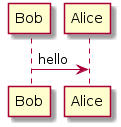
Ein schönes Tool namens PlantUML http://www.plantuml.com kann schöne UML Diagramme generieren.

Diese können als Grafik oder sogar als ASCII Art heruntergeladen werden.

Beispielausgabe:

plantuml

oder

     ┌───┐          ┌─────┐
     │Bob│          │Alice│
     └─┬─┘          └──┬──┘
       │    hello      │   
       │──────────────>│   
     ┌─┴─┐          ┌──┴──┐
     │Bob│          │Alice│
     └───┘          └─────┘


Linux: Paketanalys DNSSEC mit wireshark (tshark)

Für Server ohne GUI gibt es das Kommandozeilen Tool tshark.

Aufzeichnen von Paketen geht wie folgt:

tshark -i eth0 -a duration:200 -w /tmp/capture.pcap


diese können dann am besten in Wireshark geladen und dort analysiert werden